Removal
1. Remove console. See 4.6 FUEL TANK, Console.
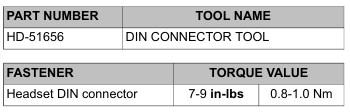
2. Using DIN CONNECTOR TOOL (Part No. HD-51656), rotate lock ring counterclockwise to loosen.
3. Remove lock ring and cap.
4. Remove headset connector and harness assembly.
Installation
1. Insert headset connector through hole in console.
2. Slide weather cap over headset connector.
3. With the notches on the outboard side, thread lock ring onto headset connector.
4. Using DIN CONNECTOR TOOL (Part No. HD-51656), tighten to 7-9 in-lbs (0.8-1.0 Nm).
5. Install console on fuel tank capturing wire harness and front headset connector harnesses in metal clips. See 4.6 FUEL TANK, Console.
6. Test operation of headset connector.
Leave a Reply