Removal
NOTE
Never operate vehicle with the speaker enclosures removed. These components provide important structural support to the fairing. Operating without these components can result in damage to fairing assembly.
1. Remove outer fairing. See 2.37 OUTER FAIRING AND WINDSHIELD: FORK MOUNTED FAIRING MODELS.
2. Remove harness anchors from speaker enclosure.
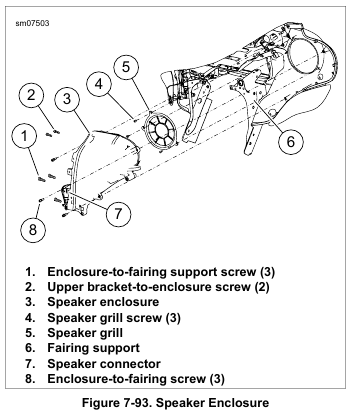
3. See Figure 7-93. Disconnect speaker connector (7).
4. Right side: Disconnect power outlet connector.
5. Left side: Remove CB module if equipped. See 7.32 BOOM! BOX INFOTAINMENT SYSTEM, CB Module: Fork Mounted Fairing.
6. Remove three screws (1) securing enclosure to fairing support (6).
7. Remove two screws (2) securing enclosure to upper support bracket.
8. Remove three screws (8). Remove speaker enclosure from fairing.
NOTE
Do not remove screws securing speaker enclosure halves together.
9. Remove four screws to free speaker from enclosure.
10. Disconnect wires and remove speaker from enclosure.
11. If necessary, remove grommet and harness.
Installation
NOTE
Verify that harness grommet is correctly installed. An incorrectly installed grommet can result in poor audio, whistling or a rattle.
1. If removed, install harness and grommet.
2. Attach speaker wire connectors.
NOTE
Verify hole in speaker frame mates with alignment pin on enclosure.
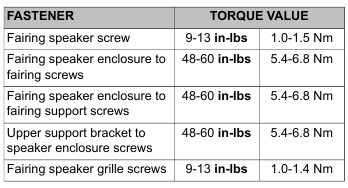
3. Install speaker and secure with four screws. Tighten to 9-13 in-lbs (1.0-1.5 Nm).
4. See Figure 7-93. Install speaker enclosure to inner fairing.
Secure with three screws (8). Tighten to 48-60 in-lbs (5.4-6.8 Nm).
5. Secure enclosure to fairing support (6) with three screws (1). Tighten to 48-60 in-lbs (5.4-6.8 Nm).
6. Secure enclosure to upper support bracket with two screws (2). Tighten to 48-60 in-lbs (5.4-6.8 Nm).
7. Mate speaker and power outlet connectors. Secure harness anchors to speaker enclosure.
8. Install CB module if equipped. See 7.32 BOOM! BOX INFOTAINMENT SYSTEM, CB Module: Fork Mounted Fairing.
9. Install outer fairing. See 2.37 OUTER FAIRING AND WINDSHIELD: FORK MOUNTED FAIRING MODELS.
Speaker Grille
1. Remove speaker enclosure. See 7.32 BOOM! BOX INFOTAINMENT SYSTEM, Front Fairing Speakers: Fork Mounted Fairing.
2. See Figure 7-93. Remove three screws (4).
3. Remove speaker grille (5).
4. Install speaker grille and secure with screws (4). Tighten to 9-13 in-lbs (1.0-1.4 Nm).
5. Install speaker enclosure.
Leave a Reply